OSDev Apps
Simple Tasks
Flexible to-do app with folders, custom fields, and private cloud backup.
A clean, flexible task manager that adapts to the way you work — not the other way around. Organize your day with folders, build your own custom fields for the details that matter to you, and back up privately to your own Google Drive or iCloud when you want to.
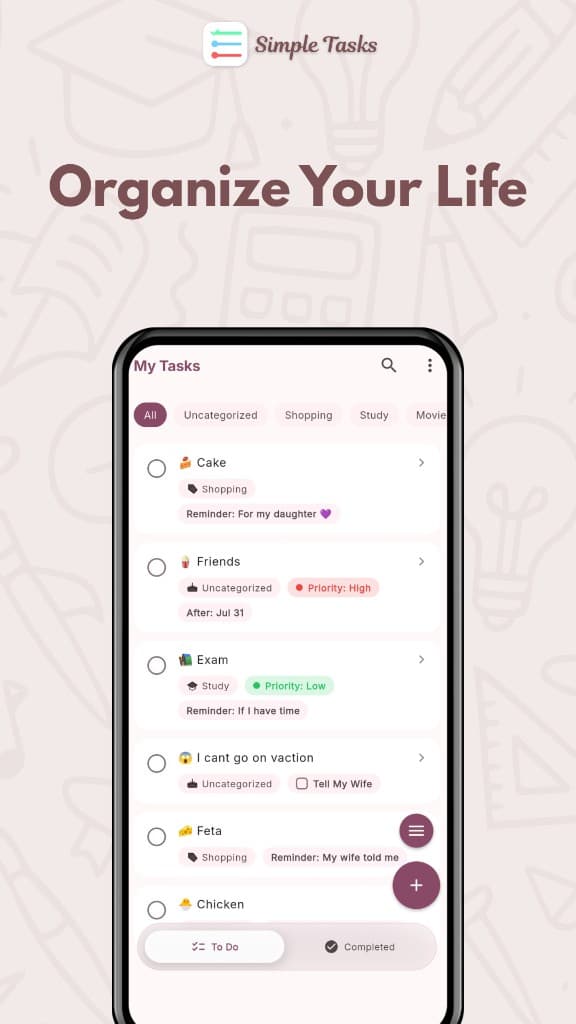
Everything you need, nothing you don't
Back up and sync, privately
Sync to your own Google Drive or iCloud account — not ours. Optional on-device encryption means only you can unlock your backup.
Custom fields, your way
Build your own task details with 6 field types: text, checkbox, single-select, multi-select, date, and number. Color-code options and auto-attach fields to new tasks.
Folders that work two ways
Hand-drawn folder icons you can switch between a horizontal filter bar and a folder grid. Show task counts per folder if you like.
Stay focused with a task limit
Set a maximum number of active tasks so you finish what you have before piling more on.
Find anything, fast
Search by title across To Do and Completed. Sort by time or alphabetically.
Bulk actions
Multi-select tasks to move, complete/undo, or trash them in a couple of taps.
Smart trash with auto-purge
Deleted tasks are recoverable, with configurable auto-cleanup (default 30 days).
Completed tasks timeline
Completed tasks grouped by day — Today, Yesterday, and beyond — so progress is visible.
Beautiful, customizable
Light / Dark / System theme
Custom accent color picker
Material 3 design with hand-drawn icons